THE WORKING RESEARCHER’S AI TOOLKIT · DAY 2 OF 6
Six short, practical guides to using AI in a research career, one a day this week. Every guide has copy-and-paste prompts that work in ChatGPT, Claude, Gemini or Copilot.
An AI job search can help with both halves of a job hunt. It takes on the slog of finding jobs, checking dozens of boards so you don’t have to. When you apply, it makes a sharp critic and a tireless interview partner. What it shouldn’t do is write your application, because recruiters can spot it and a generic statement gets binned faster than ever.
This guide is in two parts. Part 1, finding the right jobs, shows you how to set up a search that runs itself, including on the sites that won’t let an AI in, and how often to run it so you don’t burn through your plan’s limits. Part 2, applying for the job, shows you how to use AI to decode an advert, draw out your best evidence, critique your draft and rehearse the interview, while every word stays yours. Use whichever part you need. If you are happy with how you find jobs, skip straight to Part 2. If the words model, connector and scheduled task are new to you, the first guide on building an AI morning briefing explains them in plain terms.
In brief
Finding: write a short search profile once, then let an AI check the job boards for you, by web search, by reading job alert emails, or both. Many job sites block AI tools, so the most reliable trick is a separate Gmail account that only receives job alerts, which the AI reads instead of the websites. Run the search three times a week or once a day at most, because every run uses part of your plan’s allowance. Applying: write the statement yourself and use AI to find gaps, check the fit and rehearse the interview.
On this page
Start with what you’ll need.
Part 1: Finding the right jobs. Build a daily AI job search in five steps: your search profile, why AI can’t just look at job sites, where to look, a job-hunt inbox and a scheduled web search. Then how often to run it, and what it costs.
Part 2: Applying for the job. What recruiters think of AI applications, then five prompts that use AI as critic and interviewer, tools people miss and a worked example.
Finally, where to be careful, five things to try and common questions.
What you’ll need
| Tool | What it’s for | Cost |
|---|---|---|
| Any AI assistant with web search ChatGPT, Claude, Gemini, Copilot |
Decoding adverts, checking fit, critiquing drafts | Free |
| A Gmail account just for job alerts | Gets you around job sites that block AI, and keeps your job hunt out of your work inbox | Free |
| A Gmail connector | Lets the AI read that inbox | Free in Claude and Gemini. ChatGPT needs Plus (US$20 a month) |
| Scheduled tasks | A search that runs itself | Gemini scheduled actions (rolling out to free personal accounts), ChatGPT Go (£7 a month) or Plus, Claude Pro (US$20 a month) |
| Voice mode in ChatGPT, Gemini or Claude | Mock interviews, out loud | Free with limits. The phone app is easiest |
| Gemini Notebook (formerly NotebookLM) | Preparing for an interview from a group’s own papers | Free up to 50 sources a notebook |
Google’s free Interview Warmup tool, which a lot of careers advice still recommends, closed in April 2026. Voice mode in a general assistant does the same job, and does it better.
1
Part 1
Finding the right jobs
A search that runs itself, a way round the sites that block AI, and how often to run it.
Set up a daily AI job search
Academic jobs are spread across dozens of sites, from the big boards to each university’s own vacancy pages. Ordinary job alerts match keywords, so you get every “research assistant” post in the country and miss the one with an odd title. An AI job search can read the advert and judge whether it actually fits you. It takes about half an hour to set up, in five steps.
Step 1: Write your AI job search profile once
Spend ten minutes on this. It is what makes the search useful rather than noisy. Save it in a note, because you will reuse it in every prompt in this guide. If you are still deciding which roles might suit you, the Dementia Researcher Career Framework can help you explore your options.
Copy this template · My job search profile
MY JOB SEARCH PROFILE
- Roles I want: [e.g. postdoctoral research associate, research fellow]
- Field and methods: [e.g. dementia, neuroimaging, longitudinal cohorts, R]
- Must-haves: [e.g. UK only, at least 24 months, full time or 0.8]
- Nice-to-haves: [e.g. London or Manchester, wet lab and data mix, PPI involvement]
- Deal-breakers: [e.g. needs a clinical qualification I don't have, mostly animal work]
- Salary floor: [e.g. Grade 7 / around £38,000]
- Visa: [e.g. need sponsorship / don't need sponsorship]
- Places I'd most like to work: [3-5 universities, institutes or groups]
Use the copy button in the top corner, or click once inside the box to select it all. Fill in the parts in square brackets.
Step 2: Know why the AI can’t always just go and look
You would think an AI could simply visit the job sites every morning. Often it can’t. Many job boards and university recruitment systems block automated visitors, and AI agents are increasingly treated the same way. Cloudflare, which sits in front of a large share of the web, now blocks AI agents by default on ad-supported pages for new sites it protects, unless the site owner chooses otherwise. Others hide their listings behind search forms or logins that an AI cannot fill in.
In practice, the AI either gets nothing back, or worse, it gives you an out-of-date listing it found somewhere else and presents it as new. So don’t rely on web search alone. Use the job-hunt inbox in Step 3 for the sites that block AI, and use web search for the rest.
How to tell a site is blocking the AI
The AI says it “couldn’t access” the page, returns no jobs from a site you know is busy, or gives you jobs with closing dates that have passed. Ask it outright: “Did you open this site today, or are you relying on older results?” If it can’t open the site, move that site into your job-hunt inbox.
Step 3: Choose your AI job search sources
Flag the sites you already use, and let the AI suggest others. Most of the big academic boards below let you set up email alerts, which is what makes the job-hunt inbox work.
| Site | Best for |
|---|---|
| Dementia Researcher jobs board | Dementia and neurodegeneration posts, hand-picked. New jobs also go out in our weekly bulletin |
| jobs.ac.uk | Most UK university posts. Alerts can be set from any search |
| FindAPhD and FindAPostDoc | Funded PhDs and postdoc posts, UK and international |
| Nature Careers (formerly Naturejobs) | International research posts, especially in life sciences |
| British Neuroscience Association jobs board | Neuroscience jobs around the UK and Ireland, from PhDs and postdocs to industry roles |
| FENS Job Market | Neuroscience jobs across Europe, from the Federation of European Neuroscience Societies |
| EURAXESS | European posts and fellowships, including Marie Skłodowska-Curie |
| NHS Jobs | Research nurse, clinical trials and NHS research roles |
| Times Higher Education jobs, New Scientist Jobs, Science Careers | Lectureships, senior posts and international roles |
| LinkedIn and Indeed | Industry, charity and research management roles |
| CharityJob | Jobs at UK charities, including research charities, funders and patient organisations. Good for research management, grants, policy and public involvement roles |
| Academic Positions | PhD, postdoc and faculty posts at universities across Europe |
| University and institute vacancy pages | Your target employers. Many offer their own job alerts or RSS feeds |
| Charity and industry careers pages | Research charities, funders and pharmaceutical companies, which often advertise only on their own sites |
| Outside the UK and Europe | A starting point only: Science Careers and Nature Careers carry many US posts, the Society for Neuroscience runs NeuroJobs, and HigherEdJobs lists US university roles. Use the prompt below to find the boards for your own country |
This list leans towards the UK and Europe
It is a guide, not a complete list, and it is thinner for the USA, Canada, Australia and everywhere else. Add the sites that matter in your field and country, and use the prompt below to find more. If you know a good job board we have missed, please tell us in the comments at the bottom of this page, and we will add the best suggestions to the list.
To find sites you haven’t thought of, paste your search profile into any AI with web search and ask:
Copy this prompt · Where else should I look?
Here is my job search profile. I already check: [list the sites you use].

Suggest up to 10 more places where jobs like this are advertised, including specialist boards, professional societies, research centres, charities, funders and companies. For each, give the website, what kind of roles appear there, and whether it offers email job alerts.

Only suggest sites you can link to. Tell me which ones you are not sure about.

[paste your search profile]
Use the copy button in the top corner, or click once inside the box to select it all.
Step 4: Set up a job-hunt inbox for your AI
This is the workaround for sites that block AI, such as FindAPhD and many university recruitment systems. They won’t let an AI visit, but they will happily send you an email alert. So send those alerts to an inbox the AI is allowed to read.
- Create a free Gmail account just for this, something like yourname.jobs@gmail.com. Use it for nothing else.
- Sign up for job alerts on every site in your list using that address, with the same keywords as your search profile. Choose daily alerts where you can.
- Connect that Gmail account, and only that one, to your AI. In Claude, go to Settings, then Connectors. In Gemini, go to Settings, then Connected apps. In ChatGPT Plus, go to Settings, then Apps.
- Schedule the prompt below to read the last day’s alerts and sort them against your profile.
Why a separate account is worth it
The AI only ever sees job alerts, never your personal or work email, so you can give it full access without a second thought. Reading a few emails is also far quicker and cheaper for the AI than searching a dozen websites, so it uses less of your plan’s allowance. And your job hunt stays out of your current employer’s systems, which is where it belongs. If you set up an alerts inbox for your morning briefing, you can use the same one. Add a Gmail label called Jobs so the AI knows where to look.
Copy this prompt · Read my job alerts
Using my connected Gmail account, read every job alert email from the last [24 hours / 3 days] (the Jobs label).

Compare each advertised job against my search profile below. Remove duplicates: the same job often appears in alerts from several sites.

Give me a table: job title | employer | location | closing date | contract length | salary | fit (high / medium / low) | one line on why | link.

Rules:
- Leave out anything that hits a deal-breaker, but list it underneath as “excluded” with the reason, so I can check your judgement.
- Flag anything closing within 10 days.
- Use only what is in the emails. If a detail isn't there, write “not stated” rather than guessing.
- Do not reply to, forward, delete or unsubscribe from anything.

[paste your search profile]
Use the copy button in the top corner, or click once inside the box to select it all.
Step 5: Add a scheduled web search for the sites that let AI in
For everything that doesn’t send alerts, add a web search. You can combine both in one scheduled task, which saves runs.
Copy this prompt · Scheduled AI job search
Every Monday, Wednesday and Friday at 7:30am UK time, find new jobs that match my search profile below.

1. Read the job alert emails in my connected Gmail (Jobs label) since your last run.
2. Then search the web for new posts on: [the sites that don't send alerts, e.g. the vacancy pages of your target universities].
3. Merge the two, remove duplicates, and give me one table: job title | employer | location | closing date | fit (high / medium / low) | one line on why | link.

Rules:
- Only include jobs posted or updated since your last run.
- If you could not open a website, tell me which one, rather than leaving it out silently.
- Never list a job you cannot link to. If you are not sure a job is still open, say so.
- Flag anything closing within 10 days.

[paste your search profile]
Use the copy button in the top corner, or click once inside the box to select it all.
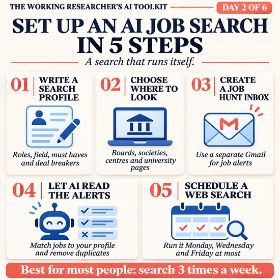
Set up an AI assisted research job search in five steps, from defining your ideal role to receiving relevant opportunities automatically.
In the first week, compare what it finds with a manual search. If it keeps missing a site, add that site’s alerts to your job-hunt inbox, or paste the vacancy page’s address into the prompt.
Watch the places that matter most. If there is a centre you would love to join, set a weekly task to check its vacancies page and tell you only when something new appears. Being one of the first to email the PI with a sensible question can make a real difference.
How often should your AI job search run?
Every scheduled run uses part of your plan’s allowance, the same as if you had typed the prompt yourself. Searching the web and opening pages uses far more than reading a few emails. Run a heavy search every morning and you may find you have hit your limit by the afternoon, just when you want help with an application.
You also have a limited number of scheduled tasks. ChatGPT allows up to 3 active tasks on Go and 5 on Plus. Gemini allows up to 10 scheduled actions. Claude’s scheduled tasks count against your Pro usage.
| How often | Good for | Allowance it uses |
|---|---|---|
| Three times a week Monday, Wednesday, Friday |
Most people. Academic adverts usually stay open for two to four weeks, so you will rarely miss one | Low. Our recommendation |
| Every weekday | Your contract ends within three months, or you are targeting fast-moving NHS or industry roles | Medium. Fine if it mostly reads your job-hunt inbox |
| Weekly | Keeping half an eye on the market while you are settled | Very low |
| Several times a day | Nobody. Jobs are not posted that fast | High, and wasted |
Two more ways to keep it cheap: put the inbox and the web search in one task rather than two, and ask for “jobs since your last run” so it doesn’t re-check everything each time. Agent modes, where the AI opens a browser and clicks through sites, use the most allowance of all. Save them for the odd tricky site, not your daily search.
2
Part 2
Applying for the job
Using AI as a critic and interviewer rather than a ghostwriter, from decoding the advert to a mock interview.
What recruiters think of AI applications
The numbers are worth knowing before you paste a job advert into a chatbot.
67%
of UK hiring managers told Robert Half that a surge in AI-generated applications has made hiring slower.
83%
of recruiters in CV-Library’s research see signs of AI-written applications.
73%
of hiring managers in a Robert Walters survey say they can tell when AI has been used.
In academic hiring, a panel reads your supporting statement next to dozens of others written with the same tools. What gets you shortlisted is the specific detail only you could have written: the assay you rescued, the cohort you recruited, the student you supervised. So the rule for this part is simple. You write it. AI helps you spot the gaps, check the fit and rehearse. Our guide to applying for a research assistant job covers the application itself in more depth.
Five prompts: AI as critic and interviewer, not ghostwriter
The trick is to reverse the usual order. Most people ask AI to write a draft and then try to make it sound like them. That never quite works. Instead, let the AI ask the questions while you supply the substance in your own words. Then it checks your draft against what the panel wants. Here are the prompts, in the order you would use them.
1. Decode the advert
Copy this prompt · Decode the advert
Here is a job advert and person specification for an academic post. Help me read it the way a shortlisting panel will.

1. List every essential and desirable criterion as a numbered checklist, in plain English.
2. Which 3 criteria are likely to decide the shortlist, and why? Look at the order, the wording and what is repeated.
3. What does the advert suggest about the project, the team and what they're worried about? Label anything that is a guess.
4. Write 3 good questions I could ask the PI in an informal conversation before applying.

[paste advert and person specification]
Use the copy button in the top corner, or click once inside the box to select it all.
2. Let it interview you for evidence
This is the most useful prompt in the guide. You type or dictate the answers, so the material stays yours. Use voice mode if you think better out loud.
Copy this prompt · Interview me for evidence
I'm applying for the job in the checklist above. Interview me to collect evidence for each essential criterion.

Ask me ONE question at a time. Start with the criterion you think I'll find hardest. Push for specifics: what I did myself, numbers, outcomes, what went wrong and what I changed. Don't move on until you have a concrete example, or I tell you I don't have one.

When we've covered every criterion, give me a table: criterion | my best example in my own words (quote me, don't polish) | how strong it is (strong / OK / weak) | what's missing.
Use the copy button in the top corner, or click once inside the box to select it all.
3. Write it yourself, then ask for a critique without a rewrite
Write your supporting statement from that table, in your own voice. For broader advice on academic applications, see our guide to securing your first postdoc role. Then:
Copy this prompt · Critique, don’t rewrite
Critique my supporting statement against the person specification. Do NOT rewrite it.

1. Map each criterion to where I address it. List any I've missed or only implied.
2. Point out sentences that are vague or generic, the kind any applicant could have written. Quote them and say what detail would fix them.
3. Flag anything that sounds AI-written or over-polished, e.g. “passionate about”, “proven track record”, “dynamic”, “leverage”, “delve”, “in today's fast-paced”.
4. Is the order right for this panel? Should the strongest evidence come sooner?
5. Give me the three changes that would most improve my chances.

[paste statement] [paste person specification]
Use the copy button in the top corner, or click once inside the box to select it all.
Then read the final version out loud. If a sentence is one you would never say to a colleague, change it.
4. Prepare for interview from their own work
Load the PI’s last eight or ten papers, the group’s web page and the job advert into a free Gemini Notebook at notebook.google.com. It answers only from those documents and shows you where each answer came from.
Copy this prompt · Interview preparation
Using only these sources:
1. Summarise this group's main questions and methods, and how they've changed over the last 5 years.
2. Where would someone in the advertised post fit in, and what problems would they be expected to solve?
3. Write 10 questions this panel is likely to ask me, including two difficult ones about weaknesses in my background: [one line on your background].
4. Suggest 3 thoughtful questions I could ask them, based on gaps or next steps in their papers.
Use the copy button in the top corner, or click once inside the box to select it all.
5. Mock interview, out loud
Open voice mode on your phone. All three of the big assistants have it free, with limits.
Copy this prompt · Mock interview panel
Act as a three-person interview panel for at [university]: the PI, a senior postdoc and an HR chair. Ask me one question at a time, mixing technical, motivational and competency questions, and follow up if my answer is vague. After 8 questions, stop and give me feedback: what landed, what rambled, and one example I should have used but didn't.
Use the copy button in the top corner, or click once inside the box to select it all.
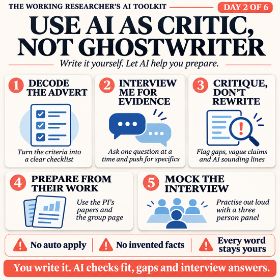
Use AI to assess job requirements, strengthen your evidence and practise interviews, while keeping every word of your application your own.
Tools people miss
LinkedIn’s AI job search Free
Describe the job you want in a sentence, such as “part-time postdoc in dementia epidemiology near Bristol”, rather than guessing job titles and filters.
The pay spine Free
Ask an AI with web search to turn the advert’s grade into a salary range at that university, and to say whether London weighting applies. Adverts often hide this.
Grant awards as early warning Free
Posts funded by a big grant are usually advertised months after the award is announced. Add Gateway to Research and NIHR Funding and Awards to your weekly search, and you can get to know a group before its advert appears.
A tracker Free
Ask the AI to turn each search into rows you can paste into a spreadsheet: job, closing date, status, contact and notes. It stops you missing deadlines when you are applying for several posts at once.
The employer’s own AI rules
A growing number of adverts ask you to declare AI use, or forbid it for parts of the application. Follow what the advert says.
Worked example: Tom’s evidence table
Tom is a made-up final-year PhD student applying for a two-year research associate post on a dementia cohort study. He ran the decoding and evidence prompts by voice on the bus, taking about 25 minutes in total. This is part of the table he got back, with his own words quoted.
| Criterion (essential) | Tom’s example, in his words | Strength | What’s missing |
|---|---|---|---|
| Experience of longitudinal data analysis in R | “Mixed models on four waves of the cognitive data for my second chapter, about 3,000 people. I had to deal with dropout, so I learned multiple imputation.” | Strong | Name the packages. Say whether it is published or under review |
| Ability to work with participants and the public | “I helped at two PPI meetings.” | Weak | What did he do there? Did anything change because of it? |
| Excellent written communication | “First-author paper, and I write the lab newsletter.” | OK | Name the journal. One line on who reads the newsletter |
The weak row was the useful one. When the AI pushed, Tom remembered that a PPI member had told him the cognitive test was exhausting. He moved it to the start of the visit, and missing data on that test fell. That is a far better example than “helped at two meetings”, and he would not have thought to use it without being asked.
When he ran the critique prompt on his draft, it flagged this sentence: “I am passionate about improving the lives of people affected by dementia.” It didn’t rewrite it. It pointed out that every applicant would write that line, and asked what had actually brought him to the field. Tom replaced it, in his own words, with two sentences about his grandmother’s diagnosis and the clinic visit where he first saw a research nurse at work. Nobody else on that shortlist could have written them.
Where to be careful
Don’t let anything apply on your behalf
Some tools and agents now offer to apply for jobs automatically. Mass applications are a big part of why recruiters are struggling, and a panel can tell. One good application beats ten generic ones.
Keep your job hunt off work systems
Don’t run your job search through your current employer’s approved AI tool or your work email. That is another reason for the separate job-hunt inbox.
Keep other people’s details out
Your referees’ contact details, and anything about colleagues or students, don’t need to go into a chatbot.
Check every fact it adds
If the AI writes “the group recently won a major European grant” and it didn’t, you have embarrassed yourself in front of the panel. Only use what you can verify.
Don’t claim skills you can’t defend
AI is good at making thin experience sound impressive. Interviews exist to find that out.
Five things to try this week
- Write your search profile and save it in a note.
- Create a Gmail account just for job alerts, and sign up for alerts on five sites with it.
- Connect that account to an AI and run the job alerts prompt once by hand.
- Schedule the combined search for Monday, Wednesday and Friday mornings.
- Pick one live advert and run the decoding and evidence prompts on it.
Common questions about AI job search and applications
Searching for jobs
Why can’t the AI see jobs on some websites?
Many job sites block automated visitors, including AI agents, or hide their listings behind search forms and logins. Sign up for those sites’ email alerts with a separate Gmail account, and let the AI read the alerts instead.
How often should I run an AI job search?
Three times a week suits most people, because academic adverts usually stay open for two to four weeks. Run it daily only if your contract is ending soon. Every run uses part of your plan’s allowance, so more often is not better.
Do I need a paid plan?
No. You can run the prompts by hand on any free plan, and Claude and Gemini can read a Gmail account for free. Paying mainly buys you a search that runs itself on a schedule.
Applying with AI
Will a panel know I used AI?
If AI wrote it, quite possibly. Generic phrasing and polished but empty claims are what recruiters say they notice. If you wrote it and used AI to critique it, there is nothing to spot.
Is it allowed to use AI in a job application?
Usually, for help and checking, unless the advert says otherwise. Some employers ask you to declare AI use, so read the application guidance.
Which AI is best for job applications?
For critique and interview practice, use the strongest model you can get, such as Claude or ChatGPT’s larger models, which are good at pushing back. For the job search, use whichever one can read your job-hunt inbox and run on a schedule.
What are my rights on a fixed-term contract while I look for work?
That is a separate question, and our guide to what UK researchers on fixed-term contracts are entitled to covers it.
Tomorrow in the AI Toolkit
Raising your profile with AI, without living online. Check what people, and AI tools, find when they look you up. Turn one paper into a summary, posts and a pitch. And spot the news and debates worth adding your voice to.
We last checked the prices, plans, features and job sites in this guide in November 2026. AI tools change every few weeks, so check each provider’s own website before relying on anything here. Dementia Researcher has no commercial relationship with any of the companies or products mentioned. If you have a prompt or tool that works well for you, tell us at dementiaresearcher@ucl.ac.uk.




 LSE Impact Blog