Most guides to research software list the tools people pick up in their first term: a reference manager, Word, SPSS or R, Google Scholar, and now an AI chatbot. Our own Essential Tools directory has plenty of those too, and most of our readers already use them. This guide covers the free research tools for PhD students and researchers that rarely make those lists.
Some of them are free and well made, but hardly anyone has heard of them. Others are new enough that they have not reached university training sessions yet. We have favoured free tools wherever we could, because research budgets are tight, access to paid software varies a lot between universities and countries, and institutional licences usually stop working when a course or contract ends.
We put this guide together to save early career researchers some of the time it takes to find and test tools like these. Treat it as somewhere to dip in when you hit a problem, rather than a list to work through from top to bottom.
In brief
Many of the most useful free research tools for PhD students are ones few people have heard of. OpenAlex and Lens.org search the literature without a subscription, Zotero will warn you before you cite a retracted paper, and JASP, jamovi and Positron can replace expensive statistics software for most students. Free AI research assistants built by non-profit labs now search papers and analyse data with citations you can check, although your university’s rules on AI and data protection come before any of them. For figures, free libraries of scientific illustrations will save you hours. For your profile, a free tool will show you where your work has been cited in policy, which is exactly the evidence promotion panels and funders ask for.
On this page
We have arranged these free research tools for PhD students in the order a project runs. It begins with finding and keeping up with research, where the free alternatives to the big subscription databases are better than most people expect, then getting more from your reference manager, which almost everyone underuses. Writing and analysis come next, including the free replacements for SPSS and NVivo that matter most if you are about to lose a licence.
After that, figures, diagrams and posters, open research, and the AI research assistants worth knowing about, which is the fastest moving section and the one with the most warnings attached. The last three are about you rather than the project: productivity and organisation, visibility and networking, and wellbeing and digital boundaries, which for some readers will be the most useful part.
It finishes with five things to do next and common questions. Jump to whatever you need.
Finding and keeping up with research
You already know PubMed and Google Scholar, and you have probably tried Connected Papers, ResearchRabbit or Litmaps for mapping a field. These are the ones that tend to get missed.
OpenAlex Free
A fully open index of the world’s research: papers, authors, institutions, funders and topics, all linked together. It was built to replace Microsoft Academic Graph when that closed, and it now sits underneath many of the newer discovery tools. The search interface is useful on its own, particularly for filtering by funder or institution, and if you do any bibliometric work the free API is the reason to learn it. openalex.org
Lens.org Free
The closest free thing to Scopus or Web of Science most people will find. It combines scholarly literature with patents, which matters more than you might think if your work sits anywhere near diagnostics, devices or drug development. Handy for citation searching when your institution does not subscribe to the big databases, or when you have left one that did. lens.org
Europe PMC Free
Most UK health researchers have landed on it by accident without realising what it does. Beyond the PubMed content it includes preprints, full text search of open access papers, and grant information, so you can see who funded a piece of work and search within methods sections rather than abstracts. europepmc.org
Scholar Inbox Free
A personalised daily digest of new papers and preprints, built by academics. You rate a handful of papers, it learns what you care about, and it sends you a ranked list. Better than a pile of saved searches, and far better than hoping the right paper turns up in your social media feed. scholar-inbox.com
Unpaywall Free
A browser extension that checks whether a legal free copy of a paywalled paper exists, from a repository or an author’s page, and shows a green tab if it does. Once you are between institutions, this becomes one of the most used tools you own. unpaywall.org
PubPeer Free
A site where researchers comment on published papers, often flagging image problems, statistical errors or data concerns long before any formal correction. The browser extension shows a notice when a paper you are reading has comments. Worth checking before you build a project on someone else’s key finding. pubpeer.com
Hypothesis Free
Lets you highlight and annotate any web page or online PDF, privately or in a shared group. A journal club can annotate the same paper without emailing PDFs around, and your notes stay attached to the source. hypothes.is
Rayyan Free version
Built for systematic and scoping reviews. Import your references from Zotero or a database search, remove duplicates, then screen titles, abstracts and full texts alongside other reviewers and settle any disagreements at the end. It learns from your early decisions and suggests which of the remaining papers look relevant, which saves a lot of time on a big search. The free version covers the core screening steps, while extras such as the PRISMA flow diagram generator sit in paid plans or come through a university subscription. If your library already pays for Covidence, compare the two before you start. rayyan.ai
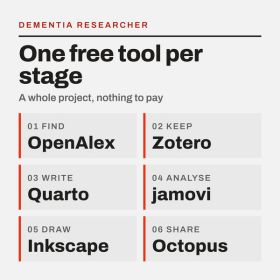
A whole PhD project run on free tools, one for each stage.
Getting more from your reference manager
We will not tell you which reference manager to use. If you are starting from scratch, Zotero is free, open source and does not disappear when you change jobs, which is why we lean that way. EndNote and Mendeley are fine if your institution supports them. What most people miss is what Zotero can do beyond storing references.
Zotero retraction alerts Built in
Zotero checks your library against the Retraction Watch database and flags anything that has been retracted. If you try to cite a retracted paper through the Word plugin, it warns you first, and if a paper already cited in your document is retracted later, it tells you when you next refresh the citations. It only works for items with a DOI or PubMed ID, so make sure those fields are filled in. You do not need to switch anything on. How it works
Better BibTeX Free
If you write in LaTeX, Overleaf, Quarto or Markdown, this plugin gives every reference a stable citation key and keeps an exported bibliography file up to date automatically. It saves a surprising amount of fiddling. retorque.re/zotero-better-bibtex
Better Notes for Zotero Free
Turns Zotero into somewhere you can actually think, with linked notes, templates and the ability to pull your PDF highlights into a structured summary. Useful for literature reviews, where the reading notes usually end up scattered across three different apps. Better Notes on GitHub
Inciteful Free
Give it a few seed papers, or import a Zotero collection, and it builds a citation network to show the most important papers you have not read yet. Its connector tool finds papers linking two separate topics, which is handy when your project sits between fields. inciteful.xyz
Best free swap
If you use Zotero, fill in the DOI field on every item. It is what makes the retraction checks, Better BibTeX keys and most of the plugins work properly.
Writing
Word, Google Docs and Overleaf will carry most people through a thesis. These free research tools for PhD students sit alongside them and help with the writing itself.
Manchester Academic Phrasebank Free
A long running University of Manchester resource that sorts the phrases academics use by what they are doing: introducing a gap, describing methods, reporting results, being cautious. Useful when you know what you want to say and cannot find the words, and particularly useful if English is not your first language. It is a bank of sentence structures, not text to copy. phrasebank.manchester.ac.uk
Quarto Free
Write your text and your R or Python code in one file, and Quarto produces a Word document, PDF, web page or slides with the results built in. When your data changes, every number, table and figure updates together. It takes an afternoon to learn and removes a whole category of copy and paste errors from a thesis chapter. quarto.org
Writefull Free tier
A language checker trained on published research rather than general writing, so its suggestions fit academic conventions better than a general grammar tool. It works inside Word and Overleaf. The free version covers the basics. writefull.com
Hemingway Editor Free web version
Not built for academics, which is the point. Paste in a paragraph and it highlights long sentences, passive voice and words you could cut. Use it on your lay summary, your plain English abstract or a funding application, where clarity matters more than convention. hemingwayapp.com
Analysis
Of all the free research tools for PhD students in this guide, these matter most if your access to SPSS, Stata or NVivo is about to end. Each of the tools below is either free or open source, so you can keep using it wherever you go next.
JASP Free
Point and click statistics that will feel familiar to anyone who learned on SPSS, with tidy APA style output and both standard and Bayesian versions of most tests. Developed at the University of Amsterdam. For most taught course and early PhD analyses, it does everything you need. jasp-stats.org
jamovi Free desktop version
Similar to JASP and built on R. The useful extra is that it can show you the R code behind each analysis, which makes it a gentle way into R if you have been putting that off. There is a library of add on modules for more specialised methods. jamovi.org
Positron Free
A newer environment for R and Python from Posit, the company behind RStudio. It treats both languages equally, includes a data explorer for looking at large datasets, and handles notebooks and scripts in the same place. RStudio is not going anywhere, but if you use both languages, or are about to start, Positron is worth a look. Posit has also just released a preview that runs in the browser on the free Posit Cloud plan, which helps if you are stuck on a locked down university PC or a Chromebook. There is an optional paid AI add on; the software itself stays free. positron.posit.co
Google Colab Free tier
Run Python notebooks in your browser with nothing to install, including limited free access to GPUs. Good for learning and for trying out a method before asking IT for anything. Not suitable for identifiable or sensitive data. colab.research.google.com
Taguette Free
A simple open source tool for coding qualitative data. Import transcripts, highlight passages, tag them, export the results. It does less than NVivo, but for a masters dissertation or a small qualitative study it is often enough, and you can run it on your own computer so the data stays with you. taguette.org
QualCoder Free
A fuller open source alternative to NVivo and ATLAS.ti, handling text, images, audio and video, with case management and reports. The interface is plainer than the commercial tools, but it covers most of what a PhD needs. QualCoder on GitHub
noScribe Free
Automatic transcription of interviews that runs entirely on your own computer, with speaker identification, built with qualitative researchers in mind. Because nothing is uploaded, it avoids the data protection problems of sending interview recordings to an online service. It is slow on older machines and you will still need to check every transcript, but it can save days. Confirm your ethics approval and data management plan allow automated transcription first. noScribe on GitHub
GitHub Student Developer Pack Free for students
Most people know GitHub. Fewer know that registered students can claim a bundle of free professional tools and services through it, including GitHub’s own paid features. Worth claiming while you are eligible. education.github.com/pack
Figures, diagrams and posters
BioRender and Canva are the usual answers, and both are good. These free research tools for PhD students cover a lot of the same ground without a subscription.
Servier Medical Art Free
Thousands of medical and biological illustrations, from cells and organs to lab equipment, released under a Creative Commons licence that allows reuse with credit. Ideal for talks, posters and graphical abstracts. smart.servier.com
Bioicons Free
A searchable library of open scientific icons in editable vector format. Licences vary between icons, so check the one attached to each before you use it. bioicons.com
SciDraw Free
Free drawings shared by researchers, particularly strong on neuroscience: neurons, brain regions, rodents and experimental setups. Useful if your figures keep needing a mouse in a maze. scidraw.io
Inkscape Free
Open source vector graphics software, and the standard free alternative to Adobe Illustrator. Use it to tidy up figures exported from R or Python, combine panels, and meet journal requirements for resolution and file type. inkscape.org
Datawrapper Free plan
Built for newsrooms, which is why its charts are so readable. Paste in a table and you get a clean chart, map or table you can embed online. Excellent for blogs, reports and public engagement, where a journal style figure would lose people. datawrapper.de
Flourish Free plan
Interactive and animated charts from a spreadsheet, including the racing bar charts you have seen on the news. On the free plan your visualisations are public, so keep unpublished data out of it. flourish.studio
draw.io Free
For flowcharts, study designs and CONSORT style participant diagrams. It works in the browser or on your desktop and saves to wherever you choose, including OneDrive. drawio.com
Excalidraw Free
A virtual whiteboard with a hand drawn look. Good for sketching a theory of change or a project plan in a supervision meeting, and you can draw on the same board at the same time as someone else. excalidraw.com
Coblis Free
Upload a figure and see how it looks to people with different types of colour blindness. A two minute check that stops a red and green heatmap becoming unreadable for a fair share of your audience. Coblis colour blindness simulator
Better Poster Free templates
A conference poster layout built around one big, plain statement of your main finding, so people walking past get the point in seconds. Free templates are available for PowerPoint and other software. It divides opinion, which is a good reason to look at it before your next conference. Better Poster templates
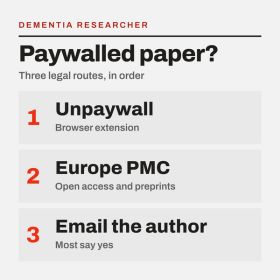
Three legal routes to a paywalled paper, in the order to try them.
Open research
ORCID and the Open Science Framework are well known, and if you do not have an ORCID iD yet, stop reading and get one. The free research tools for PhD students below go a step further.
ORCID auto-update Free
Most people create an ORCID record and never touch it again. If you allow Crossref and DataCite to update it, new papers and datasets are added automatically when they are published. It takes a minute in your ORCID settings. orcid.org
AsPredicted Free
A short, simple preregistration form: your hypothesis, your outcome, your analysis, your sample size. It can stay private until you choose to share it. A good first step if a full OSF preregistration feels like too much. aspredicted.org
protocols.io Free for public protocols
Share step by step lab and study protocols with a DOI, so others can cite and reuse them and you get credit for the method rather than burying it in a supplementary file. Private workspaces need a paid plan. protocols.io
RRIDs Free
Research Resource Identifiers are unique IDs for antibodies, cell lines, model organisms and software. Adding them to your methods makes it much easier for anyone to find the exact resource you used, and some journals now ask for them. rrids.org
Octopus Free
A UKRI funded platform where you publish your research in stages as you go: the problem, the hypothesis, the methods, the data, the analysis and even peer reviews, each credited to whoever did it. It is free to publish and free to read. One feature students tend to like is that research questions posted by UK government departments appear on Octopus as research problems you can respond to, which gives your work a direct line to policy. octopus.ac
AI research assistants worth knowing about
General assistants such as ChatGPT, Claude and Gemini are now everywhere, and so are Elicit, Consensus and Scite. This section is about the newer tools built specifically for research, several of them by non-profit labs. They change quickly, so we will revisit this section regularly.
Before you use any AI tool
Read your university’s policy on AI first. Many institutions now approve specific tools and rule out others, and the rules for assessed work and theses are often stricter than for research.
Never upload identifiable participant data, interview recordings or unpublished data to a tool your institution has not approved, and check what your ethics approval and data management plan allow. If in doubt, ask your data protection officer.
Check every citation an AI tool gives you against the original paper, and record how you used AI so you can declare it when you publish or submit.
Ai2 Asta Free
Built by the Allen Institute for AI, the non-profit behind Semantic Scholar. Its paper finder breaks your question into parts, searches, follows citations, judges which papers are relevant and tells you why each one was chosen, with a quicker standard mode and a slower deep search for complicated questions. There is also a data analysis tool that turns plain language questions into analyses you can check and repeat. The agents are open source, which is unusual in this field. asta.allen.ai
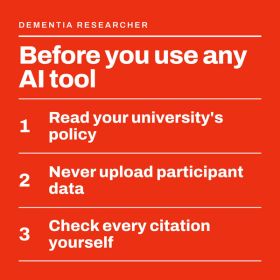
Three rules that come before any AI research assistant.
Edison Scientific Free tier
The commercial spin out of FutureHouse, a non-profit lab building what it calls AI scientists. Its tools cover literature search and data analysis, and its flagship system, Kosmos, works through a research question by analysing data, searching the literature and proposing hypotheses, then produces a cited report. A free account includes a small monthly allowance of credits. Treat the headline performance claims with care, as much of that evaluation has been done by the company itself, but it is a useful look at where research tools are heading. edisonscientific.com
NotebookLM Free
Google’s research notebook only answers from the documents you give it, and it shows which passage each answer came from. Load in a set of papers or your own reading notes and ask questions across all of them. The generated audio overviews are a surprisingly good way to revise a topic on a commute. The same data rules apply: public papers are fine, anything sensitive is not unless your institution has approved it. notebooklm.google
Productivity and organisation
Everyone has a to do list app. The free research tools for PhD students in this section are about organising what you know and protecting the time you have.
Obsidian Free
Obsidian keeps your notes as plain text files on your own computer rather than on someone else’s server. To link one note to another, you type its name in double square brackets. If you use Zotero, a community plugin will bring your references and PDF highlights across. Until 2025 you needed a paid licence to use Obsidian for work, but that requirement has been dropped, and the only thing you might pay for now is the optional sync service. obsidian.md
Logseq Free
An open source alternative to Obsidian built around a daily journal page. If you like writing a quick log of what you did each day, which is a good habit for a lab book or a thesis diary, Logseq makes that the centre of everything. logseq.com
Rallly Free
A simple, ad free way to find a meeting time with people outside your institution, such as co-authors, external supervisors or a steering group. No account is needed for the people you invite. rallly.co
Pomofocus Free
A plain browser timer for working in focused blocks with short breaks. There is nothing to install, and you can attach a short task list so each block has a purpose. pomofocus.io
Visibility and networking
LinkedIn matters more for research careers than it used to, and many researchers have moved to Bluesky. Beyond the obvious profiles, these free research tools for PhD students will help people find your work and help you show what it has achieved.
Sage Policy Profiles Free
Shows where your published work has been cited in policy documents, guidelines and think tank reports, using data from Overton. You get a personal dashboard, alerts when new policy citations appear, and exports you can drop into slides. It is designed for exactly the evidence promotion panels, fellowship applications and funders now ask for. It works for researchers in any field, not only those who publish with Sage. policyprofiles.sagepub.com
Overton Institutional licence
The full database behind Sage Policy Profiles, with far more search and analysis options. It is a paid service, but many UK universities subscribe, so check your library before you assume you do not have access. overton.io
Kudos Free for researchers
Add a plain language summary to each of your papers, share it through tracked links and see which channels bring readers. Useful for working out whether that conference tweet or that newsletter mention actually made a difference. growkudos.com
Altmetric bookmarklet Free
A button for your browser bar that shows the online attention a paper has received: news, blogs, policy, social media. Click it on any article page. Handy for your own work and for spotting which papers in your field are getting noticed outside academia. You will need an institutional email address to register, as personal addresses such as Gmail are not accepted. Get the Altmetric bookmarklet
The Dementia Researcher Community Free
Our own community and app, for researchers in dementia and neurodegeneration to connect, ask questions and run journal clubs, wherever they are based. Find out more
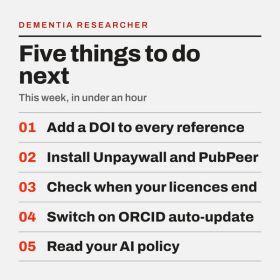
Five things worth doing this week, none of which take long.
Wellbeing and digital boundaries
Every one of the free research tools for PhD students in this guide promises to save time. Put enough of them together and you spend your day switching between apps, answering notifications and maintaining systems instead of doing research. So this section is mostly about using less.
Your phone and laptop’s focus settings Built in
iPhone, Android, Windows and macOS all have focus modes that silence chosen apps at set times. Most people never set them up. A writing focus that blocks email and messaging for two hours each morning costs nothing and does more than most productivity apps.
Scheduled send Built in
Outlook and Gmail both let you write an email now and send it later. If you work late, schedule it for the morning. It keeps your own evenings quieter too, because replies stop arriving at midnight, and it avoids setting that expectation for the students and colleagues around you.
Cold Turkey Blocker Free version
Blocks distracting websites and apps on a schedule, and unlike most blockers it is hard to switch off in a weak moment. The free version covers website blocking, which is what most people need. getcoldturkey.com
An audit, twice a year
List every research tool and app you use. For each one, ask whether you opened it in the last month, whether it does something no other tool does, and whether you will lose it when you leave. Delete what fails. Then turn off notifications for everything that does not need to interrupt you, which is nearly everything. If you are struggling, tools are not the answer, and your university wellbeing service or our Essential Tools directory is a better place to start.
Choosing free research tools for PhD students
There is no need to try every one of these free research tools for PhD students at once. Start with whichever part of your work takes up the most time, try one tool for a couple of weeks, and then decide whether it has earned a place.
Where there is a choice, go for free or open source software, since you can carry on using it whatever you do after your current course or post. And if you are still weighing up further study, our guide on whether a masters is worth it covers the decision in the same detail.
Five things to do next
- Fill in the DOI field for every item in your reference library, so the retraction checks work.
- Install Unpaywall and the PubPeer extension in your browser.
- Find out which of your software licences end when your course or contract does, and try the free alternative now rather than the week before.
- Set up a free Sage Policy Profiles account and switch on ORCID auto-update.
- Read your university’s AI policy before you upload anything to an AI tool.
- You can Free Research Tools for PhD Students and Researchers with all the resources and links mentioned in this article.
Common questions about free research tools for PhD students
What are the best free research tools for PhD students?
It depends on your field, but a strong free set would be Zotero for references, OpenAlex or Lens.org for searching the literature, Unpaywall for legal free copies of papers, JASP or R for statistics, Taguette or QualCoder for qualitative analysis, Inkscape and Servier Medical Art for figures, and Obsidian for notes. All of them stay available after you leave your university.
What are the most useful apps for PhD students?
A reference manager such as Zotero, a note taking app such as Obsidian, and a way to protect your time, whether that is the focus mode on your phone or a simple timer like Pomofocus. Add Unpaywall to your browser and Rallly for arranging meetings with people outside your university. Most PhD students get more from using a few tools well than from trying lots of new ones.
Can I get paid software free as a student?
Often, yes. Registered students can claim the GitHub Student Developer Pack, which includes free professional tools and services, and many universities provide Microsoft 365, statistics software and qualitative analysis software while you are enrolled. Several tools in this guide, including Positron on Posit Cloud, Google Colab and Datawrapper, also have free plans that anyone can use.
Is there a free alternative to Scopus or Web of Science?
Lens.org is the closest free option for most people, covering scholarly literature and patents with citation searching. OpenAlex is a fully open index of papers, authors, institutions and funders, and Europe PMC adds full text search of open access papers and grant information.
How can I read a paywalled paper for free, legally?
Install the Unpaywall browser extension, which finds free versions held in repositories and on author pages. Check Europe PMC for open access versions and preprints. If neither works, email the author, since most researchers are happy to send a copy of their own paper.
Is there free software for systematic reviews?
Rayyan has a free version that covers the core steps, including importing and removing duplicate references and screening abstracts and full texts with other reviewers. Covidence is widely used but usually needs an institutional subscription, so check with your library first. You can collect papers in Zotero and export them to either tool for screening.
Is there a free alternative to EndNote?
Zotero is free and open source, works with Word, Google Docs and LibreOffice, and can import an EndNote library. Plugins such as Better BibTeX and Better Notes add features that many paid reference managers lack.
Is Zotero or Mendeley better for PhD students?
Both are free and both will manage a thesis bibliography. Mendeley is owned by the publisher Elsevier. Zotero is open source and run by a non-profit, has a large library of plugins, and includes retraction alerts. If you are starting from scratch we lean towards Zotero, but if your group already shares a Mendeley library, stick with what your colleagues use.
How do I check whether a paper has been retracted?
Zotero checks your library automatically against the Retraction Watch database for any item with a DOI or PubMed ID. PubPeer is also worth checking for comments raising concerns about papers that have not been retracted.
Are there free tools to help with academic writing?
The Manchester Academic Phrasebank gives you sentence structures for each part of a paper, Writefull has a free tier that checks language against published research, and the free web version of Hemingway Editor helps simplify lay summaries and funding applications. Quarto is free and keeps your results and text in step.
Is there a free alternative to SPSS?
JASP and jamovi are both free, point and click statistics packages that will feel familiar to SPSS users, and jamovi can show you the R code behind each analysis. If you want to code, R and Python are free, and Positron is a free environment for both.
Is there a free alternative to NVivo?
Taguette is a simple open source tool for coding text, and QualCoder is a fuller alternative that also handles audio, video and images. Both run on your own computer, and they cover what most masters and PhD projects need.
Is there a free way to transcribe research interviews?
noScribe is free, open source and runs entirely on your own computer, so recordings are never uploaded. Check that your ethics approval and data management plan allow automated transcription, and never upload identifiable recordings to an online service your institution has not approved.
Where can I find free scientific illustrations?
Servier Medical Art, Bioicons and SciDraw all offer free scientific images. Check the licence on each, as most require you to credit the source, and use Inkscape to edit and combine them.
What is Octopus?
Octopus is a free, UKRI funded platform where researchers publish each stage of their work separately, from the research problem and hypothesis to methods, data, analysis and peer review. It sits alongside traditional journals rather than replacing them.
What are the best free AI research assistants?
Ai2 Asta, from the team behind Semantic Scholar, is free and shows why it chose each paper it finds. NotebookLM answers only from documents you give it, and Edison Scientific has a free tier for literature search and data analysis. Check every citation against the original paper.
Can I use AI tools for my thesis?
It depends on your university, as most now set out which tools are approved and what counts as acceptable use in assessed work. Read the policy, talk to your supervisor, keep a record of how you used AI, and declare it where required.
What is the best free note taking app for a PhD?
Obsidian is free for all use and stores notes as plain text files on your own computer, and a plugin connects it to Zotero. Logseq is an open source alternative built around a daily journal page, which suits a lab book or thesis diary.
How can I show the policy impact of my research?
Sage Policy Profiles is a free tool that shows where your publications have been cited in policy documents, using Overton data, and lets you export the results. Many universities also subscribe to the full Overton database, so check with your library.
How do I stop research tools taking over my day?
Use the focus modes built into your phone and laptop to silence apps at set times, schedule emails rather than sending them late at night, and review the tools you use twice a year. Delete anything you have not opened in a month.
What happens to my software when I leave university?
Institutional licences for tools such as SPSS, NVivo, EndNote and Microsoft 365 usually end when your course or contract does, sometimes immediately. Export your data and libraries in open formats before you leave, and learn the free alternatives while you still have access to both.
We last checked the tools, features and prices in this guide in September 2026. These change often, so please look at each tool’s own website before relying on anything here. Apart from our own community app, Dementia Researcher has no commercial relationship with any of the tools listed. If you use something that deserves a place on this list, let us know at dementiaresearcher@ucl.ac.uk.


 LSE Impact Blog
 Nature Careers Blog
 Dr Yvonne Couch