
THE WORKING RESEARCHER’S AI TOOLKIT · DAY 3 OF 6
Six short, practical guides to using AI in a research career, one a day this week. Every guide has copy-and-paste prompts that work in ChatGPT, Claude, Gemini or Copilot.
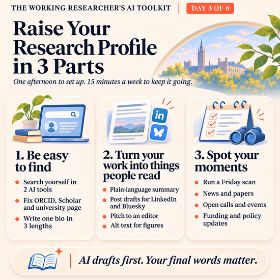
Three practical ways to use AI to raise your research profile, from improving your online presence to sharing your work and spotting opportunities.
Learning to raise your research profile matters for grants, jobs and collaborations, and it’s much more than posting on social media. It’s being easy to find when someone looks you up, having a plain-language version of your work ready, writing a blog, giving a talk, answering a consultation, or being the person who has something useful to say when your topic is in the news. AI can’t build your reputation for you, but it can cut the time each of those things takes.
Keeping up with the sector is part of it too. You can only add your voice to a debate, respond to a funder’s new priorities or comment on a big trial result if you know it’s happening, and in time. It also shows. The researcher who knows a funder has changed its rules, or that a policy report has just landed, comes across well in an interview, a grant panel or a conversation at a conference. An AI scan makes that a 15-minute job each week.
This is a guide to where AI can help, not a complete guide to raising your profile. If you want broader advice on networking, social media and communicating your research, we have plenty of that too, and you’ll find the best of it in the common questions at the end.
This guide is in three parts. Part 1, being easy to find, shows you how to check what people, and AI tools, see when they look you up, and how to fix it in an afternoon. Part 2, turning your work into things people read, takes one paper and turns it into a plain-language summary, posts and a pitch, with every final word still yours. Part 3, spotting your moments, sets up a weekly scan that finds the news, debates and open calls worth adding your voice to. If the words model, connector and scheduled task are new to you, the first guide on building an AI morning briefing explains them in plain terms. If you’re looking for a new role, Day 2 shows how to use AI to find and apply for research jobs.
In brief
This guide shows you how to raise your research profile with the people who matter, such as funders, employers, collaborators and journalists, without living online. It takes an afternoon to set up, then about 15 minutes a week. By the end you will have:
- Profiles that people and AI tools can find, after checking what comes up when someone searches for you and fixing what’s missing or out of date.
- A plain-language version of your latest paper, plus posts and a pitch to a blog, with AI doing the first rough draft and you writing the final words.
- A weekly scan that spots your moments: the news, debates and open calls where your work gives you something worth saying.
Everything works on a free AI plan. Start with the 15-minute check in Part 1.
On this page
Start with why it’s worth a little time and what you’ll need.
Part 1: Being easy to find. See yourself as AI search sees you, write your bio once, in three lengths and tidy your publication record.
Part 2: Turning your work into things people read. A plain-language summary, posts for different platforms, a pitch to an editor and alt text for figures.
Part 3: Spotting your moments. A weekly scan for chances to add your voice, finding your angle and the moments that come round every year.
Finally, a worked example, where to be careful, five things to try and common questions.
Why raising your research profile is worth a little time
The numbers suggest most researchers are online for work, and that the pressure falls hardest on those starting out.
78%
of researchers use social media for work, in a Springer Nature survey of more than 10,000 academics.
60%+
of researchers in a De Gruyter Brill survey feel pressure to keep up an online presence. Early career researchers felt it most.
1 in 5
academic accounts had moved to Bluesky, in a study of 300,000 academics on X.
The academic crowd has spread out. LinkedIn is now the main platform for work, according to The Scholarly Kitchen, and Bluesky has picked up much of the research community that used to be on X. So choosing where your community is matters more than posting everywhere.
There’s a newer reason too. People increasingly ask ChatGPT or Gemini “who works on this in the UK?”, and those tools answer from what they can find about you on the open web. Not everything is open to them. Much of LinkedIn sits behind a login, and a growing number of sites block AI tools and bots altogether. So if you are only properly present in one place, an AI search may not find you at all. Being in several places, with your ORCID, university page, Google Scholar profile and at least one social account all up to date and saying the same thing, gives people and AI tools more than one way to find you.
What you’ll need to raise your research profile with AI
| Tool | What it’s for | Cost |
|---|---|---|
| Any AI assistant with web search ChatGPT, Claude, Gemini, Copilot |
Checking how you appear online, drafting summaries and posts, critiquing pitches | Free |
| Scheduled tasks in your AI assistant A setting in ChatGPT, Claude or Gemini, not a separate app |
Runs your weekly scan for moments to add your voice automatically, so you don’t have to remember it | Gemini scheduled actions (rolling out to free personal accounts), ChatGPT Go (£7 a month) or Plus, Claude Pro (US$20 a month) |
| Your profiles ORCID, Google Scholar, university page, LinkedIn, Bluesky |
Where people, and AI tools, look you up | Free |
| A social media scheduling app (optional) Such as Buffer, Typefully or Hootsuite |
Holds your posts for LinkedIn, Bluesky and other platforms and publishes them at the times you choose. Connect it to your AI and it can add the posts you’ve approved, if you’re comfortable linking your accounts | Free with Buffer, including its AI connector |
| Image upload in any assistant | Alt text for the figures and posters you share | Free |
No downloads needed, and connectors are optional here. Many people prefer to keep posting a manual step, pasting the words in themselves once they’re happy with them. If you’re comfortable going further, a social media scheduler such as Buffer, Typefully or Hootsuite can connect to Claude or ChatGPT. The AI can then put the posts you’ve approved straight into your schedule for LinkedIn, Bluesky and other platforms, so there’s no copying and pasting. Buffer’s connector works on its free plan. Ask the AI to save posts as drafts for you to check, so nothing goes out under your name that you haven’t read.
1
Part 1
Being easy to find
What people and AI tools see when they look you up, and how to fix it in an afternoon.
The first step to raise your research profile is finding out what’s already out there, before you post anything new. It takes about 15 minutes, and most people find at least one profile that is years out of date.
See yourself as AI search sees you
Run this in two different assistants with web search switched on, such as ChatGPT and Gemini. They draw on different sources, and the differences tell you something.
Copy this prompt · How do I look online?
Search the web and tell me what you can find about [your full name], a  at [institution] working on [topic].

1. Summarise who this person is and what they work on, as you'd explain it to someone asking "who works on [topic] in the UK?"
2. List every profile or page you found (ORCID, Google Scholar, university page, LinkedIn, Bluesky, lab website, news stories), with links.
3. Point out anything inconsistent: different job titles, old institutions, missing recent papers.
4. Is anyone else with the same name getting mixed up with me?
Use the copy button in the top corner, or click once inside the box to select it all. Fill in the parts in square brackets.
If the summary is vague or wrong, that’s your to-do list. Common problems are an ORCID with no recent work, or a university page still showing your PhD project.
Write your bio once, in three lengths
Most of us rewrite our bio from scratch for every talk, poster and website. Write the facts once in rough notes, then let the AI do the rewording.
Copy this prompt · My bio in three lengths
From my notes below, write my professional bio in three versions:
- One line (under 25 words) for a social media profile
- Short (about 60 words) for a conference programme or speaker introduction
- Long (about 150 words) for a university page or website

Use the third person for the short and long versions, and the first person for the one-liner. Plain English, with no jargon a member of the public wouldn't know. Don't add any achievements, numbers or adjectives that aren't in my notes. Avoid "passionate", "dedicated" and "renowned".

My notes:
Use the copy button in the top corner, or click once inside the box to select it all.
Then paste the right version into each profile. Use the same job title and institution everywhere. That consistency is what helps people, and AI tools, tell you apart from someone else with your name.
Our tip: keep your Dementia Researcher profile up to date too
Everyone who writes a blog, presents a webinar or guests on a podcast with us gets a profile on Dementia Researcher. If you have one, use your new bio to update it through our bio form. It’s another page that people, and AI tools, will find when they search for you.
Tidy your publication record
Ask an AI with web search to compare your Google Scholar and ORCID lists and tell you which papers appear on one but not the other. Then add the missing ones yourself. Don’t give any tool your ORCID password.
2
Part 2
Turning your work into things people read
One paper, several outputs: a summary, posts, a pitch and alt text, with the final words still yours.
You already have what you need to raise your research profile: papers, posters, talks, a thesis chapter. What takes the time is rewording it for each audience. AI is good at that first rough pass, and that’s all these prompts ask for. The final words should still be yours, especially the opening line. That’s the bit people respond to, and the bit that sounds most like AI when a machine writes it.
A plain-language summary you can reuse
Start here. Everything else in this part builds on it.
Copy this prompt · Plain-language summary
Here is the abstract of my paper [or paste the full text]. Help me explain it to people outside my field.

1. In 3 sentences, what did we find, and why does it matter to someone affected by dementia? No jargon. Use words a 14-year-old knows.
2. What's the single most surprising or useful number or finding?
3. What does this NOT show? List the limits a journalist might overstate.
4. Suggest 3 everyday comparisons that could help explain the main finding, and say which one is least misleading.

Don't overstate the findings. If the study is in mice, cells or a small sample, say so clearly.
Use the copy button in the top corner, or click once inside the box to select it all.
The third question is the one people skip. It stops you, and any press office, turning “associated with” into “causes”.
Posts for different platforms
Copy this prompt · Raw material for posts
Using the plain-language summary above, give me raw material for posts about my new paper. I'll write the opening line myself, and I'll edit the rest.

FIRST, LEARN HOW I WRITE
Here are 3 things I've written myself, such as old posts, an email to a colleague or a paragraph from a blog:
[paste 3 short examples]
Match my sentence length, my vocabulary and how formal or chatty I am. If my examples are plain and short, keep yours plain and short.

WHAT I NEED
- LinkedIn (up to about 150 words): the finding, why it matters for practice or policy, and who I worked with.
- Bluesky (under 300 characters including the link): the finding in one sentence, plus one reason to click.
- 3 alternative opening lines for each, in very different styles: a question, a surprising number, a personal reason.

MAKE IT SOUND LIKE A PERSON, NOT AN AI
- Write the way I'd explain it to a colleague over coffee. Use "we found", not "this study demonstrates".
- Mix short and longer sentences. Use contractions (it's, we're, didn't).
- Use one concrete detail from the paper (a number, a place, a group of people) rather than general claims.
- British spelling.
- Don't use: thrilled, excited to share, delighted, delve, game-changer, groundbreaking, pivotal, crucial, unlock, navigate, landscape, journey, "in today's world", "not just X but Y", or lists of three adjectives.
- No em dashes, no rhetorical questions in the body, and no closing line that sums everything up.
- No hashtag clutter (two at most) and no emojis unless I ask.
- Don't make the finding sound bigger than the summary does.

Tag my co-authors as [names and handles]. Mention all of them or none.

FINALLY, CHECK YOUR WORK
Underline or list any phrase in your drafts that still sounds like AI or marketing copy, so I can rewrite it.
Use the copy button in the top corner, or click once inside the box to select it all.
The examples of your own writing make the biggest difference. Without them, every assistant falls back on the same upbeat, polished style, and readers have learned to spot it. Save your three examples in a note and paste them in every time. Then read the draft out loud and change anything you wouldn’t say to a colleague.
Pitch to an editor
Blogs, newsletters, podcasts and The Conversation all take pitches from researchers. So do we. Dementia Researcher is always looking for early career voices: you can share your blog with us here, or pitch an idea for our podcast by emailing dementiaresearcher@ucl.ac.uk. The prompt below works for a podcast pitch too.
Copy this prompt · Critique my pitch
Help me pitch an article to [outlet]. First, search the web and tell me in 3 bullets what kind of pieces they publish, how long they are and who reads them.

Then critique my pitch below against that: is the angle new, is it timely, why me, and is it short enough? Don't rewrite it. Suggest the 3 changes that matter most.

[your pitch, 150 words or so]
Use the copy button in the top corner, or click once inside the box to select it all.
Alt text for figures and posters
Every time you share a figure, a poster or a slide, add alt text so people using screen readers get the point too. It takes ten seconds.
Copy this prompt · Alt text for a figure
Write alt text for this figure for a screen reader user, under 125 characters. Then write a longer description of about 50 words I can use as a caption. Describe what the figure shows, not just its title.
Upload the image with the prompt. Check the description against your own figure before you post it.
3
Part 3
Spotting your moments
The news, debates and open calls where your work gives you something worth saying.
Posting more isn’t the best way to raise your research profile. Turning up at the right moment is. That might be a new report in your area that journalists are covering, a funder consultation looking for early career views, a blog asking for contributors, or a debate on research culture where nobody has said what it’s like at your career stage. The trick is noticing them in time, and that’s what an AI scan is good at.
A weekly scan for chances to add your voice
This scan doesn’t just tell you what happened. It looks for things you could respond to, and suggests what you could do about each one. Schedule it for Friday afternoon, so you can decide over the weekend whether anything is worth your time. You can run it as a task of its own, or build it into the AI morning briefing from Day 1 of this series as a Friday-only section. The tip below the prompt explains how.
Copy this prompt · My weekly moments scan
Every Friday at 4pm UK time, search the web for chances this week for me to raise my profile. I am a  at [institution] working on [topic], using [methods].

Look for:
1. News, reports and papers in [topic] that journalists or my field are talking about, where my own work gives me something to add.
2. Open calls in the next 6 weeks: blogs or podcasts looking for contributors, conference abstracts, panels, prizes, consultations and calls for evidence in [field].
3. Policy and funding news from UKRI, NIHR, Wellcome and the main charities in my field, such as Alzheimer's Research UK and Alzheimer's Society, that affects work like mine.
4. Debates about research careers and culture in Times Higher Education, Wonkhe or HEPI where an early career view is missing.

For each item: what happened, the link, why it's a moment for me in one line, and one suggested action (post, comment, pitch, apply, or email someone). Put the best two at the top.

Rules: one screen maximum. Never list anything you can't link to. Say "quiet week" if there's nothing worth my time. Don't write posts for me. I'll do that myself.
Use the copy button in the top corner, or click once inside the box to select it all.
Our tip: add it to your morning briefing
If you set up an AI morning briefing on Day 1, add this as a Friday-only section of that task rather than creating a new one. You only get a few scheduled tasks on most plans, and one weekly web search uses very little of your allowance.
Finding your angle
When something in the scan catches your eye, the hard part is working out whether you have anything to say, and how to say it without claiming more than your work shows. Use this before you write a word.
Copy this prompt · Do I have something to say?
Here is a news story [paste it or give the link] and a short summary of my research [paste].

Help me decide whether I have something worth saying about it.
1. What does my work add that the coverage misses?
2. What would I be overclaiming if I commented? Be blunt.
3. Who else is already commenting, so I can join the conversation rather than repeat it?
4. Give me 3 possible angles in one line each. Don't write the post. I'll pick one and write it myself.
Use the copy button in the top corner, or click once inside the box to select it all.
Sometimes the honest answer is that you don’t have anything to add, and that’s useful to know too. Sharing someone else’s good work with one line on why it matters to your field still counts.
Yearly moments to raise your research profile
Some moments you can see coming months ahead: World Alzheimer’s Day in September, Dementia Action Week in May, the big conferences in your field, and the results of major trials. Ask an AI with web search to build you a 12-month calendar of the awareness days, conferences and funding rounds relevant to your topic, with dates. Then plan one thing for two or three of them, such as a plain-language post or a pitch to a blog, rather than trying to do everything.
On Bluesky, custom feeds and starter packs make it easier to see what your community is talking about. There’s a directory of over 200 field-specific science feeds, and starter packs let you follow a whole community at once. Ask an AI to help you find the ones for your field. Better still, ask a colleague which ones they actually read.
Worked example: Aisha puts all three parts together
Aisha is a made-up research fellow whose paper on hearing aids and cognitive decline has just come out. Here’s how she used the three parts of this guide, starting with an hour and a free AI.
| Minutes | Task | What AI did | What she did herself |
|---|---|---|---|
| 0–15 | Profile tidy-up (Part 1) | Found her ORCID was missing two papers and her university page still listed her PhD project | Updated both, and pasted the new short bio everywhere |
| 15–30 | Plain-language summary (Part 2) | Drafted the 3-sentence summary and the “what this does NOT show” list | Caught an overstatement (“prevents” became “is linked to slower”) and added the cohort size |
| 30–45 | LinkedIn and Bluesky posts (Part 2) | Gave raw material and 3 opening lines | Wrote her own opening, about her grandad’s hearing aids sitting in a drawer. Tagged all five co-authors |
| 45–60 | Pitch to a blog editor (Part 2) | Researched the outlet and critiqued her pitch | Cut the pitch from 300 words to 140 and sharpened the angle to “the NHS gives hearing aids away, so why do so few people wear them?” |
The AI saved her most of the blank-page time, and she made every decision about what went public. Then came Part 3. Two weeks later, her Friday scan flagged a national newspaper story on hearing loss and dementia risk. She ran the angle prompt, decided her cohort finding added something the coverage had missed, and posted a short thread linking to her paper. It was her most shared post of the year, and a good example of how you can raise your research profile by turning up at the right moment rather than posting more. She plans to run the audit prompt again in three months to see whether AI search describes her any differently.
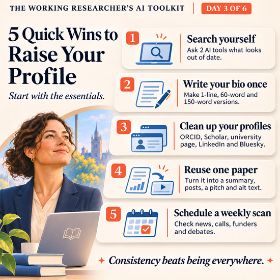
Five simple ways to improve your research visibility with AI, without spending hours on social media.
Where to be careful: raise your research profile without damaging it
AI can save you a lot of time, but used carelessly it can just as easily damage your reputation.
Read every post before it goes out
If you connect a scheduler, have the AI save posts as drafts and approve each one yourself. Never let it reply to people, like posts or follow accounts for you. That kind of automation is easy to spot, breaks most platforms’ rules, and wears away the trust that made being visible worth it.
Never let AI overstate your findings
It tends to make results sound bigger and cleaner than they are. Check every claim in a summary against the paper.
Check your press office and funder rules
Some journals have embargoes, some funders want acknowledging in a set way, and your university may want to know before a story goes out.
Don’t post AI-generated images of your research
A made-up microscopy image or brain scan on a post about real research is misleading, even as an illustration. Springer Nature journals, for example, won’t publish AI-generated images at all.
Watch what you upload
A published paper is fine to paste. An unpublished draft, reviewer comments or participant quotes are not, unless you’re using a tool your university has approved.
Five ways to raise your research profile this week
- Run the “how do I look online?” prompt in two assistants and compare the answers.
- Write your bio in three lengths and update every profile with the same title and institution.
- Compare your ORCID and Google Scholar lists and fill the gaps.
- Turn your most recent paper into a plain-language summary, including the “what this does NOT show” list.
- Schedule the Friday moments scan, or add it to your morning briefing.
Common questions about raising your research profile with AI
Being found online
How do I find out what ChatGPT says about me?
Ask it, with web search switched on, using the prompt in Part 1. Try Gemini or Copilot as well, because each one finds different sources, and the answer can change from week to week. Checking twice a year is plenty.
What can I do if an AI gets facts about me wrong?
You can’t edit what it says directly. Start by fixing the pages it reads, such as your university page, ORCID and Google Scholar, because that’s where most mistakes come from. Use the thumbs-down or feedback button on the wrong answer. If it’s serious, OpenAI and Google both have privacy request forms for inaccurate personal information, and UK data protection law gives you the right to ask for it to be corrected. Changes can take weeks to show.
I keep getting mixed up with someone who has the same name. How do I fix that?
Use exactly the same version of your name everywhere, including a middle initial if that helps, along with the same job title and institution. Add your ORCID iD to your university page, email signature and social profiles, and link your profiles to each other. That gives people and AI tools a clear trail that points to you.
Do I really need both ORCID and Google Scholar?
Yes, and both are free. ORCID is your permanent researcher ID, which many funders and journals ask for. Google Scholar is where people go to check what you’ve published. Setting up both takes about 20 minutes, and they keep working for you after that.
Should I still be on X, or move to Bluesky or LinkedIn?
Go where the people in your field actually are. Look at where the researchers, funders and journals you follow post most often. Many research communities have moved to Bluesky and LinkedIn, but it varies by field and country. You don’t have to delete an old account to start using a new one, and doing one platform well beats spreading yourself across three.
Posting with AI
Will people be able to tell my post was written by AI?
If AI wrote it, often yes. Readers have learned to spot the upbeat, polished style and phrases like “excited to share”. LinkedIn can also label images made with some AI tools. If you write the opening yourself, give the AI examples of your writing and edit the draft, there’s much less to spot.
Do I have to say I used AI to write a post?
There’s no general rule for social media posts, unlike journal papers, where most publishers ask you to declare AI use. Check whether your university or funder has guidance for staff. A good test: if you’d be uncomfortable admitting how much the AI wrote, rewrite it until you wouldn’t be.
Is it OK to paste my paper into ChatGPT?
A published paper is generally fine. Don’t paste anything under embargo, unpublished drafts, reviewer comments or participant data. Most assistants have a setting that stops your chats being used to train their models, so switch that on if you haven’t already.
How often should I post?
Once a week, or even once a fortnight, is fine. Posting regularly matters more than posting a lot, and one useful post beats five forgettable ones. You don’t need to post every day to raise your research profile.
I hate self-promotion. Do I have to do this?
Sharing your research isn’t bragging. It’s making publicly funded work easier to find and use. If posting about yourself feels uncomfortable, share other people’s good work with a line on why it matters, or just do Part 1. Up-to-date profiles help people find you without you posting anything at all.
Getting started
Do I need a paid AI plan?
No. Every prompt here works on a free plan if you run it yourself. Paying mainly buys you a weekly scan that runs on a schedule.
Can I write a blog or pitch a podcast for Dementia Researcher?
Yes, we’re always looking for early career voices. You can share your blog with us here, or email a podcast idea to dementiaresearcher@ucl.ac.uk. Everyone who writes a blog or guests on a podcast with us gets a profile on the site.
Where can I find general advice on raising my profile, without the AI?
This guide is about how AI can save you time. For broader advice on being visible as a researcher, start with these:
Next in the AI Toolkit
Writing with AI, as an editor not a ghostwriter. Using AI to plan, critique and tighten your papers, grant applications and theses, while the ideas and the words stay yours.
We last checked the prices, plans, features and statistics in this guide in November 2026. AI tools change every few weeks, so check each provider’s own website before relying on anything here. Dementia Researcher has no commercial relationship with any of the companies or products mentioned. If you have a prompt or tool that works well for you, tell us at dementiaresearcher@ucl.ac.uk.



 Rahul Sidhu





 LSE Impact Blog