THE WORKING RESEARCHER’S AI TOOLKIT · DAY 5 OF 6
Six short, practical guides to using AI in a research career, one a day this week. Every guide has copy-and-paste prompts that work in ChatGPT, Claude, Gemini or Copilot.
Using AI for a literature review goes wrong in one predictable way: you ask a chatbot for papers, and it writes references from memory, some of which don’t exist (but some do). Used properly, AI is far better at other jobs that should still be useful. It can build a search strategy you’d struggle to write yourself, question a paper harder than you have time to, and show you the shape of a field you’ve just walked into.
This guide is about working with the literature that already exists: finding it, reading it and making sense of it. It doesn’t cover keeping up with new papers each week, because Day 1’s AI morning briefing already does that, with a watch list for the papers, journals and people you follow. It’s also a guide to where AI helps, not a full guide to writing a literature review. For that, you’ll find our best general advice in the common questions at the end.
The guide is in three parts. Part 1, finding the right papers, uses AI to build your search and AI search engines to run it, then checks every reference is real. Part 2, reading a paper properly, uses AI to question papers, explain methods and prepare for journal club. Part 3, getting up to speed on a new field, maps who works on what, which papers everything builds on, and where the arguments are. After that, two shorter sections cover systematic and scoping reviews and turning your own reading into something you can search.
In brief
This guide shows you how to use AI for a literature review without putting a single invented reference in your work. It’s for a PhD student starting out, a researcher moving into a new area, or anyone who needs to get on top of a topic quickly. By the end you will:
- Know which tools to trust: AI search engines built on real databases, readers that answer only from papers you give them, and maps of how papers connect. A general chatbot is not one of them.
- Have prompts for each job: building a search string, questioning a paper, explaining an unfamiliar method, and finding who’s arguing about what.
- Have one rule that keeps you safe: if you can’t open the paper, it doesn’t go in your work.
Most of the tools here are free. Start with the search strategy prompt in Part 1.
On this page
Start with the made-up reference problem and the tools you’ll need.
Part 1: Finding the right papers. Let AI build the search, ask AI search engines full questions and check every reference.
Part 2: Reading a paper properly. Question the paper, get a method or figure explained and prepare for journal club.
Part 3: Getting up to speed on a new field. Map the field, find the key groups and debates and check whether a finding has held up.
Then systematic reviews, your own reading library, bonus: turn your papers into a podcast, a worked example, where to be careful, five things to try and common questions.
Why AI for a literature review can go wrong: made-up references
If you remember one thing from this guide, make it this: a general chatbot is the wrong tool for finding papers. It doesn’t look them up. It writes what a reference should look like, and the numbers show how often that goes wrong.
146,932
non-existent citations in papers from 2025 alone, a conservative estimate from an audit of 111 million references across arXiv, bioRxiv, SSRN and PubMed Central.
1 in 277
papers contained at least one fabricated reference by early 2026, according to the same research.
6 of 8
general chatbots in one test made up a substantial share of the academic references they were asked for.
The same audit found that invented references tend to credit people who are already well cited, and male scholars more often. So the errors aren’t random, and they make existing inequalities worse. The fix is simple: use tools that search real databases and link to every paper, and open everything before you cite it.
The tools you’ll need to use AI for a literature review
The useful tools fall into four kinds. Most researchers end up using one or two of each.
| Tool | Good for | Cost |
|---|---|---|
| AI search engines: find papers in real databases | ||
| Google Scholar Labs | Detailed questions across Scholar’s whole index, with a reason given for each paper | Free Sign in with a Google account |
| Semantic Scholar | Discovery and filtering, with a one-line summary for each paper | Free |
| Consensus | “What does the evidence say about X?” questions | Free plan, paid from about US$12 a month billed yearly |
| Undermind | A slow, thorough search when you need to be sure you haven’t missed anything | Free plan, paid about US$16 a month |
| Readers: answer only from papers you give them | ||
| Gemini Notebook Formerly NotebookLM, at notebook.google.com |
Questions answered only from the papers you upload, with each answer linked to the passage it came from | Free up to 50 sources a notebook |
| Any AI assistant, with a PDF uploaded | Questioning a single paper, explaining methods and figures | Free |
| Maps: show how papers connect | ||
| ResearchRabbit | Building a map from several papers you trust, and finding related work and authors | Free for one project, paid from about US$10 a month |
| Connected Papers | A quick visual map of the papers most similar to one you start from | Free for 5 maps a month |
| General research: a first look only | ||
| Deep research in ChatGPT, Gemini or Claude | A first overview of an unfamiliar area. It searches the web and links its sources, but check every one | Limited on free plans, more on paid |
No downloads are needed. Your university library may also give you free access to tools like Scopus AI. Ask a subject librarian, who will also know which tools your institution recommends, and can help you with a search for a formal review.
1
Part 1
Finding the right papers
Let AI build the search, run it yourself in real databases, and check every reference before it goes anywhere.
The first step when you use AI for a literature review is the search, and this is where a chatbot is most useful in a way most people never try.
Let AI build the search, then run it yourself
A general chatbot is good at synonyms, MeSH terms and Boolean logic, and it never needs to cite anything to write a search string. So use it for that, and nothing else.
Copy this prompt · Build my search strategy
I'm searching the literature on this question: [your question, e.g. "Does hearing aid use slow cognitive decline in older adults with hearing loss?"]

1. Break it into concepts (population, exposure or intervention, outcome).
2. For each concept, list synonyms, spelling variants and the relevant MeSH terms.
3. Write a PubMed search string using Boolean operators and field tags, such as [tiab] and [MeSH].
4. Adapt it for Scopus or Web of Science.
5. Tell me which terms are likely to pull in a lot of irrelevant results, and how to narrow them.

Don't list any papers. I only want the search strategy.
Use the copy button in the top corner, or click once inside the box to select it all. Fill in the parts in square brackets.
Paste the string into PubMed yourself and look at the first 50 results. If they’re off, tell the AI what’s wrong, such as “lots of cochlear implant papers, which I don’t want”, and ask it to revise. Two or three rounds usually gets you a string worth saving. Our blog on preparing a search strategy for a systematic review covers the principles behind it.
Ask AI search engines full questions
AI search engines such as Google Scholar Labs, Consensus and Undermind search real databases and link every result to a real paper. Their strength is detailed questions, which keyword searches handle badly. So don’t type keywords. Ask the whole question, and say what you’ll accept:
Copy this prompt · A detailed question for an AI search engine
[Longitudinal studies] in [adults over 60] that measured [hearing aid use] and [a validated cognitive outcome] over at least [two years]. Exclude [cross-sectional studies and studies of cochlear implants].
Swap in your own study type, population, exposure, outcome and exclusions.
Run the same question in two tools. Each draws on a different database and none covers everything, so the papers that only one of them finds are often the most useful. Note the words those papers use in their titles, and add them to your PubMed string.
Check every reference before it goes anywhere
Whatever tool found a paper, check it yourself before it goes into your notes, a draft or a reference list. It takes a minute each.
- Does it exist? Search the exact title in Google Scholar or PubMed, and open the DOI. If you can’t find it in two minutes, assume it doesn’t exist.
- Is it the paper you think it is? Check the authors, year and journal match.
- Does it say what you’re citing it for? Read at least the relevant section, not just the AI’s summary or the abstract.
Add papers to a reference manager such as Zotero from the real record, using its browser button or the DOI, never by copying a reference out of an AI’s text. That one habit stops most invented references getting into your work.
2
Part 2
Reading a paper properly
Question the paper, not the abstract, and get the parts you don’t understand explained.
AI summaries are tempting, but they flatten. They tend to drop the limitations and repeat the abstract’s claims. Using AI for a literature review works far better when you make it answer specific questions from the full text. Upload the PDF to Gemini Notebook, which answers only from your sources and links each answer to the passage it came from, or to any assistant.
Question the paper, not the abstract
Copy this prompt · Question this paper
Using only this paper, answer these questions. Quote or point to the section for each answer. If the paper doesn't say, write "not reported".

1. Design, setting, sample size, and who was included or excluded.
2. The main outcome, and how it was measured.
3. The main result, with the effect size and confidence interval, not just the p-value.
4. What the authors claim in the abstract and discussion, compared with what the results actually show. Flag any gap.
5. Limitations the authors admit, and any they don't.
6. Funding and conflicts of interest.
Use the copy button in the top corner, or click once inside the box to select it all.
The fourth question earns its keep. Abstracts often say more than the results support, and asking for the difference makes it visible.
Get a method or figure explained
Every field has methods you’ve never used, and papers that assume you know them. Rather than nodding along, ask.
Copy this prompt · Explain this method
I'm a [your background, e.g. psychologist] reading this paper. Explain [the method, analysis or figure, e.g. "the Mendelian randomisation analysis" or "Figure 3"] in plain terms.

1. What does it do, and why did the authors choose it here?
2. What would a result like theirs look like if the finding were real, and if it weren't?
3. What are the usual weaknesses of this approach, and does this paper address them?
4. What two questions should I ask about it at journal club?

Base your answer on this paper. Tell me clearly when you're giving general background rather than something the paper says.
Upload the paper, or a screenshot of the figure, with the prompt.
Prepare for journal club
Once you’ve run the two prompts above, ask the AI to argue against you. “Here’s my view of this paper: [two or three sentences]. Play a sceptical colleague at journal club. What are the three strongest challenges to my view?” It’s good practice for vivas and conference questions too. For papers you’re reviewing for a journal, don’t do any of this: unpublished manuscripts must never go into an AI tool, and our guide to peer reviewing a paper explains why.
3
Part 3
Getting up to speed on a new field
Starting a PhD, a new project or a new job: who works on what, which papers matter, and where the arguments are.
Moving into a new area is where using AI for a literature review saves the most time. The hard part isn’t finding papers, it’s knowing which ones matter. Experts carry a mental map of their field: the papers everyone builds on, the groups to watch, the questions people still argue about. These tools help you build that map in days rather than months.
Map the field from papers you trust
Start with two or three papers you know are important, perhaps ones your supervisor or a recent review recommends. Put them into ResearchRabbit, or one at a time into Connected Papers. You’ll see the papers they cite, the ones that cite them, and clusters of related work. Look for three things:
- The older papers everything links back to. These are the foundations your field assumes you’ve read.
- The clusters. Separate groups of papers that rarely cite each other often mean separate camps, methods or disciplines working on the same problem.
- The names that keep appearing. These are the groups worth following, and possibly the people to talk to at your next conference.
Find the key groups and the live debates
Once you have a rough map, use deep research or an AI search engine to fill in the picture. This is a first overview, not a finished review, so check every source it gives you.
Copy this prompt · Get me up to speed on a field
I'm new to research on [topic] and come from [your background]. Search the literature and give me an overview I can check.

1. The 5 to 10 papers or reviews that most of the field builds on, with links.
2. The main research groups working on this now, and what each is known for.
3. The questions people still disagree about, with a paper on each side.
4. The methods that dominate, and any newer methods people are adopting.
5. The best recent review to read first.

Link every paper. If you're not sure a paper exists, leave it out rather than guess.
Run this in deep research or an AI search engine, not in a plain chatbot without web search.
Check whether a finding has held up
A famous finding isn’t always a solid one. Before you build on a result, look for the evidence against it.
Copy this prompt · Has this finding held up?
Search the literature for the strongest evidence AGAINST this claim: [claim, e.g. "hearing aid use slows cognitive decline"].

Include failed replications, null results, and critiques or commentaries. Link every paper. If you find nothing substantial, say so rather than stretching weak evidence.
Again, use an AI search engine or deep research, not a plain chatbot.
Systematic and scoping reviews
Formal reviews have rules, and using AI for a literature review doesn’t change them. Tools such as Rayyan learn from your include and exclude decisions to speed up screening, and Elicit can pull data from many papers into a table. Both can save real time on a big review. But if AI screens or extracts anything, say so in your protocol and report it in your methods, as you would for any other tool, and have a person check a sample of its decisions. Keep your database searches in PubMed, Scopus or similar as the record of what you searched, because AI search tools can’t be reproduced exactly. Talk to a subject librarian early: they can help design the search and know what your institution has access to.
Your own reading library
The papers you’ve already read are a resource most people can’t search, and this is the part of using AI for a literature review that keeps paying off. Keep them in a reference manager such as Zotero, then create a Gemini Notebook for each project and upload the key papers, up to 50 per notebook. You can then ask questions across everything you’ve read: “Which of these papers measured hearing with an audiogram rather than self-report?” or “Where do these studies disagree about the size of the effect?” Every answer links back to the passage it came from, so you can check it in seconds. Upload open-access papers and your own work freely, but check your library’s guidance before uploading paywalled PDFs.
Bonus
Turn your papers into a podcast (and more) with NotebookLM
Once your papers are in a Gemini Notebook (formerly NotebookLM), the Studio panel can turn them into other formats. Everything it makes is built only from the sources you uploaded.
- Audio Overviews: a podcast from your papers. Two AI hosts talk through your sources. Choose Deep Dive for the full discussion, Brief for a summary of a minute or two, Critique for a constructive expert review, or Debate for two sides arguing it out. You can set the length and the focus, and play it in the mobile app on your commute or a walk.
- Video Overviews. Narrated slides that pull in figures, quotes and numbers from your papers. The newer Cinematic style adds animation (English only, over-18s).
- Mind maps. A clickable map of the main themes across your papers. It’s a quick way to see how a new field fits together, and it works well alongside mapping the field.
- Flashcards and quizzes. They’re useful before a viva, a lab meeting or a teaching session. Tap “explain” on any card to see where the answer came from.
- Slide decks, infographics and reports. These give you a first draft of journal club slides (they export to PowerPoint), a one-page visual summary, or a briefing document or study guide.
Copy this prompt · Steer your Audio Overview
The listener is a [PhD student / postdoc] in dementia research who already knows the basics of [topic].

Skip the background. Focus on the methods, how big the effects really are, and the main limitations. Say clearly where the authors' conclusions go further than their data, and where these papers disagree with each other.
Paste this into the customise box (the pencil icon) before you generate the Audio Overview.
Treat it as a way in, not a replacement for reading. The hosts sound confident even when they oversimplify, mix up two studies or overstate a result, so check anything you plan to rely on against the paper itself. Don’t share an overview made from paywalled papers publicly, and say it’s AI-generated if you use one in teaching.
Worked example: using AI for a literature review in an afternoon
James is a made-up first-year PhD student. His supervisor has asked for “a quick look at what’s known about hearing aids and cognitive decline” by Friday.
The search (Part 1). He ran the search strategy prompt. The first string was close, but the AI flagged its own problem: “amplification” would pull in laboratory papers on signal and DNA amplification. James dropped the term, and asked it to exclude cochlear implants because his supervisor wanted hearing aids only. He pasted the revised string into PubMed himself.
His final PubMed search string
(“Hearing Aids”[MeSH] OR “hearing aid*”[tiab] OR “hearing rehabilitation”[tiab]) AND (“Cognitive Dysfunction”[MeSH] OR “Dementia”[MeSH] OR “cognitive decline”[tiab] OR “cognitive impairment”[tiab] OR dementia[tiab]) AND (“Longitudinal Studies”[MeSH] OR “Cohort Studies”[MeSH] OR longitudinal[tiab] OR cohort[tiab] OR prospective[tiab]) NOT (“Cochlear Implants”[MeSH] OR “cochlear implant*”[tiab])
Then he asked Google Scholar Labs the full question, to catch anything PubMed’s indexing missed. Two papers turned up that his string hadn’t found, so he added the words from their titles to his search.
The map (Part 3). He put the most-cited trial into ResearchRabbit. It showed a cluster of commentaries arguing about whether the trial’s main result applied to everyone or only to a high-risk subgroup. He would have missed that argument from the abstracts alone.
The reading (Part 2). He uploaded the six key papers to a Gemini Notebook and ran the “question this paper” prompt on each. For two of them, the question comparing claims with results exposed the same subgroup issue.
What he took to his supervisor was a one-page summary he wrote himself, the saved search string, and a list of six papers he had opened and read. Every reference was real, because none of them came from a chatbot’s memory.
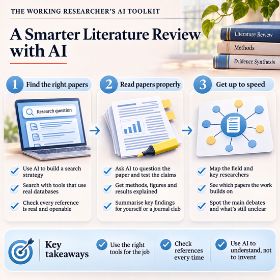
Three ways AI can support a literature review: find credible papers, assess the evidence and map your field, while checking every reference yourself.
Where to be careful when using AI for a literature review
Never ask a general chatbot for references from memory
“Give me five papers on X” is how invented citations happen. Use a search tool that links to real records.
Summaries flatten
AI summaries tend to leave out limitations and overstate findings, especially when the tool only sees the abstract because the full text is paywalled. For anything you will cite, read the paper.
Coverage varies
Each AI search tool draws on a different database, and none covers everything. Use two, and keep PubMed or Scopus as your record of what you searched.
Paywalled and unpublished work
Uploading a paywalled PDF to a public AI tool may break the publisher’s licence. Manuscripts you’re reviewing must never be uploaded at all.
Formal reviews have reporting rules
If AI screens or extracts anything, say so in your protocol and methods, and have a person check a sample.
Five ways to start using AI for a literature review this week
- Use the search strategy prompt on your current question, and run the result in PubMed.
- Ask Google Scholar Labs the same question in full sentences, and compare what it finds.
- Run the “question this paper” prompt on the paper for your next journal club.
- Put two or three papers you trust into ResearchRabbit, and look for the clusters and the names that keep appearing.
- Set up a Gemini Notebook for your current project with its ten most important papers.
Common questions about using AI for a literature review
Using AI for a literature review
Can ChatGPT do a literature review for me?
No. A plain chatbot writes references from memory and some won’t exist, and even with web search it won’t find everything or judge the papers the way you would. Use it to build your search strategy and to question papers you’ve found, and use AI search engines and maps to find the papers. The review itself, and the judgement in it, has to be yours.
What is the best AI tool for a literature review?
There isn’t one, because each does a different job. A good free starting set is Google Scholar Labs and Semantic Scholar for searching, Gemini Notebook for reading, and ResearchRabbit for mapping. Add Consensus for “what’s the evidence” questions, and Undermind when you need to be sure you haven’t missed anything.
Why does ChatGPT make up references?
Because a plain chatbot doesn’t look papers up. It predicts what a reference to a paper on your topic would probably look like, so it produces realistic author names, journals and titles that may not exist. Tools that search a real database and link to every result don’t have this problem in the same way, though you should still open everything.
How do I check if a reference is real?
Search the exact title in Google Scholar or PubMed and open the DOI. Check the authors, year and journal match. If you can’t find it in two minutes, assume it doesn’t exist. Then check the paper actually says what you’re citing it for.
Is deep research in ChatGPT or Gemini good enough for a literature review?
It’s a useful first look at an unfamiliar area, and it links its sources. It is not a literature review. It searches the web rather than academic databases, it won’t find everything, and its summaries can overstate findings. Check every source it cites.
Is it cheating to use AI for a literature review?
Not if you use it the way this guide describes. Using AI to build a search, find papers and understand them is much like using a database or asking a librarian. Passing off AI-written text as your own work is different, and universities treat that as misconduct. Rules vary between universities, courses and journals, so check yours, say how you used AI where you’re asked to, and keep your prompts in case anyone asks.
Is NotebookLM good for a literature review?
Yes, for reading and comparing papers you’ve already chosen. NotebookLM, now Gemini Notebook, answers only from the sources you upload and links each answer to the passage it came from, which makes it easy to check. It isn’t a search tool, so find your papers elsewhere first, and it holds up to 50 sources per notebook on the free plan. It can also turn your papers into a podcast-style Audio Overview, as our bonus section explains.
Papers, access and formal reviews
Is it legal to upload research papers to ChatGPT or NotebookLM?
It depends on the paper. Open-access papers under a Creative Commons licence and your own work are generally fine. Papers you get through your library are different: many library licences don’t allow you to put them into third-party AI tools, and the UK’s text and data mining exception may not cover tools like ChatGPT. Check your library’s guidance first. Never upload a manuscript you’re reviewing for a journal.
Can I use AI for a systematic review?
Yes, for jobs like screening and data extraction, using tools such as Rayyan or Elicit. Say so in your protocol and methods, have a person check a sample of the AI’s decisions, and keep your database searches as the record of what you searched.
Are Elicit and Consensus free?
Both have free plans with limits, which are enough to try them properly. Consensus resets its free allowance each month, while Elicit gives a one-off allowance of credits. Paid plans cost roughly US$12 to US$20 a month for an individual, less if you pay yearly, and prices change often, so check each tool’s own pricing page. Google Scholar Labs and Semantic Scholar are free.
Getting started
How do I keep up with new papers in my field?
That’s a different job from a literature review, and Day 1 of this series covers it. Our guide to building an AI morning briefing shows you how to send your journal alerts to their own inbox and have AI sort them every morning, along with the people, funders and jobs you’re watching.
Where can I find general advice on writing a literature review?
This guide is about how AI can help. For broader advice on literature reviews, start with these:
Tonight at 8pm in the AI Toolkit
Data analysis and code with AI, the last in the series. Getting help with statistics, R and Python, without handing over sensitive data or trusting code you can’t check.
We last checked the prices, plans, features and statistics in this guide in November 2026. AI tools change every few weeks, so check each provider’s own website before relying on anything here. Dementia Researcher has no commercial relationship with any of the companies or products mentioned. If you have a prompt or tool that works well for you, tell us at dementiaresearcher@ucl.ac.uk.

 Dr Ajantha Abey






 LSE Impact Blog